
Features

What Kairo actually does.

Described plainly, including the limits. Most of these exist because something specific went wrong and was fixed.

Downloads

The download engine

Real pause and resume

Pausing stops the transfer and keeps what has been downloaded, along with a record of which source it came from. Starting again continues from that point.

Kairo only continues when the source is the same one those bytes came from. If it has moved to a different mirror, or the file is gone, it starts cleanly instead - mixing two sources would produce an archive of exactly the right size and entirely wrong contents.
Cancel means cancel

Cancelling deletes the partly downloaded file. That is the difference between Cancel and Pause, and it is why the temp folder does not silently fill with abandoned archives.

Anything left behind by an interrupted session is swept on startup - but never a file a queued or paused job still depends on, and never one less than six hours old.

Automatic source selection

When you have not picked a source, Kairo checks whether each candidate is alive before committing to it. Deliberately cautious: only an explicit "this file is gone" skips a source, and a source you chose by hand is never skipped.

Failover that explains itself

If a source fails mid-transfer, Kairo moves to the next and the log records which source failed, why, which one it moved to, and how many remain. When they are all exhausted it says that plainly rather than showing a generic error.

Multipart packages

Archives split across many files stay one job. Every part must be present and verified before extraction begins, so a missing part fails early with a clear reason instead of halfway through unpacking.

Torrents from local files

Import a .torrent you already have and Kairo uses its bundled engine. The file and its history are not published anywhere, and torrent support is for content you are entitled to.

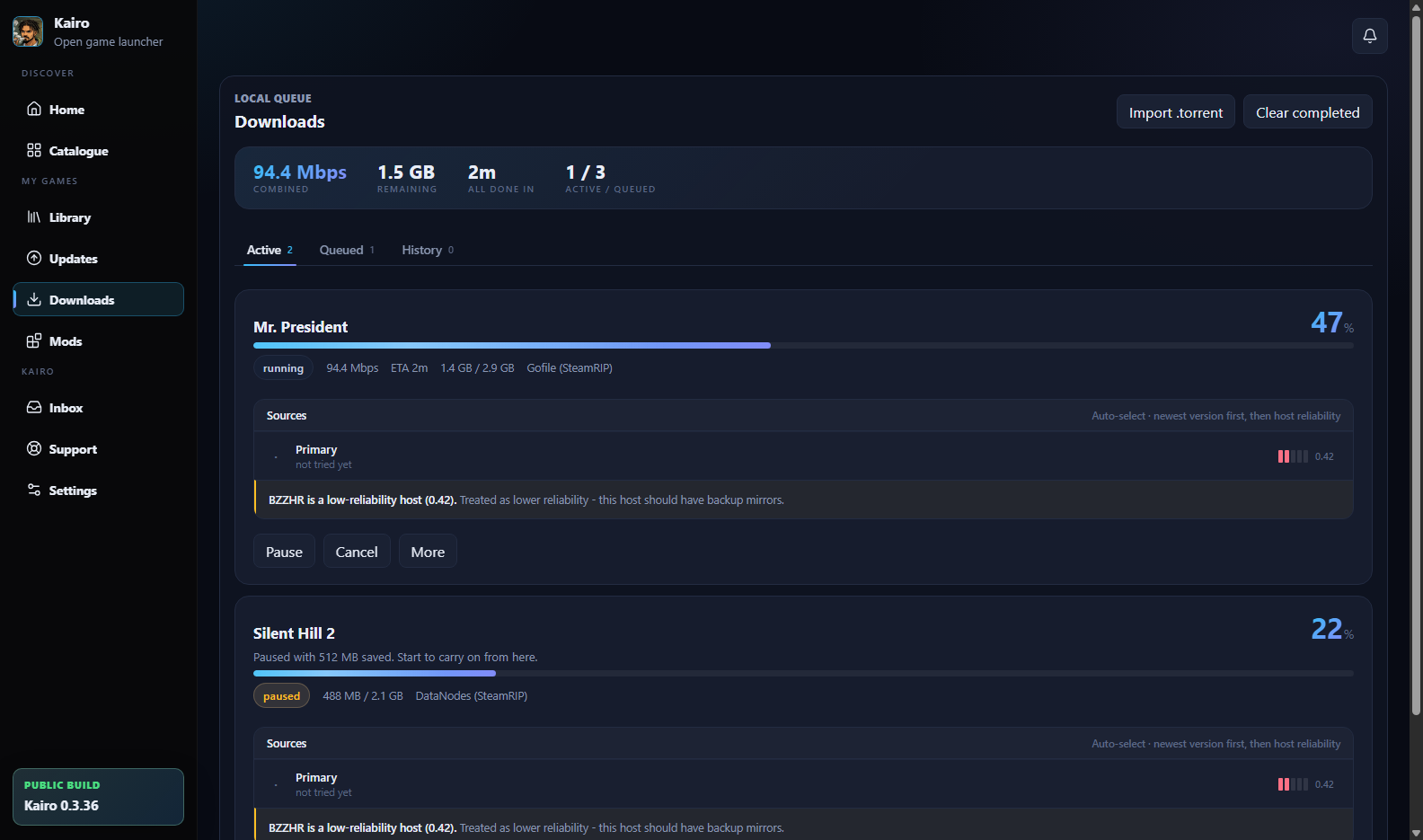
The Kairo downloads queue: one transfer running at 47%, one paused showing the bytes it kept, and per-source detail with a host reliability warning.
An active transfer, a paused one showing the bytes it kept, and the source detail behind each.

Progress keeps moving when the window does not

Repaints used to be tied to animation frames, which stop entirely while a window is minimised or hidden - so a download would appear frozen at 0% while it was actually finishing. A hidden window now keeps its progress current, and there is a test that runs the real interface with animation frames suppressed to prove it.

Storage

Space is checked before anything starts

A large game needs room three times over: the downloaded archive, the temporary copy during extraction, and the installed game. Kairo estimates all three.

What Kairo plans for before a download begins
WhatWhy it matters
Drive choicePick which disk takes the install, with free space shown for each before you commit.
Archive spaceThe download itself, which for a large game can exceed the installed size.
Extraction headroomBoth the archive and the extracted files exist at once during install.
Temporary folderKept separate from the library so it can be swept without touching installed games.
Archive retentionOptional. Keep the downloaded archive after install, or let Kairo delete it.
Library

Installed games, tracked honestly

Reconciled against the disk

Every install writes a record into its own folder. On startup Kairo reads those records back, so the library is not just whatever the app happened to remember.

  • It only ever adds - a second copy elsewhere is reported as a duplicate rather than replacing what you have
  • A folder on a drive that was not scanned is never called missing, because an unplugged drive is not a deleted game
  • Games installed before a settings change are still found

Removal judged by the folder

Removing a game is judged by whether the installed folder is gone - not by counting deleted paths. A deleted shortcut once counted as success, which dropped the library entry while the game stayed on disk.

  • The dialog lists what will actually be deleted before you confirm
  • It states plainly that deletion does not use the Recycle Bin
  • Saves stored inside the game folder are called out as a loss; saves elsewhere are reported as safe

Two kinds of reinstall

Full reinstall deletes the installed folder and installs a fresh copy, leaving nothing from the old build behind. Reinstall and replace files installs over the current folder, so saves and mods kept inside it survive - and so do leftovers from the previous build. Full is the default because it is the one that repairs a broken install.

Kairo refuses to delete a folder that is not a game folder: a drive root, a library root, a personal folder such as Documents, or a Windows folder. In that case it stops rather than quietly installing over the top instead.

Mods

Mods, without holding your credentials

Where Vortex is installed, Kairo works through it, so your Nexus login stays in the tool that already manages it.

Profiles you can revert

Switching profiles restores the original files and removes what the profile added. A file changed outside Kairo is never silently overwritten.

Archives inspected first

Mod archives are read before anything is written. Path traversal, Windows path aliases and dangerous payloads are refused rather than staged.

Known layouts only

A mod is deployed only when both its layout and the target game are recognised. Anything else is blocked with an explanation instead of a guess.

Current limitation

Kairo's Nexus registration is not complete, so browsing mods needs either Vortex installed or your own personal Nexus API key. Kairo will not ship a shared key: a desktop application cannot keep a secret, and such a key would be extractable from the installed files.

Steam

Steam games are recognised, not touched

What it does

Kairo reads local Steam library folders to notice that a game is already installed and managed by Steam. Those entries are labelled as Steam-managed, launch through Steam, and are left out of Kairo's own update and repair flows.

What it never does

It never reads Steam credentials, cookies or ownership records. Matching is by exact App ID only - never guessed from a title - and a local manifest is never treated as a claim that you own something.

Transparency

When something goes wrong, you can see why

  • Each install writes a log naming every step, the source used, and how the job ended - finished, cancelled or failed
  • A resumed download says it resumed and from how many bytes; a restarted one says why it could not continue
  • Source failures name the provider, so a host's outage does not look like the app breaking
  • A full reinstall records that it deleted the previous installation, and where
  • Problem reports can be sent with reproduction steps and screenshots, and only when you choose to send them
Appearance

Three looks, and the old one never disappears

Nova is the default. Modern and Legacy remain selectable, because a redesign should not force everyone to relearn the app on the same day.

See it on your own machine.

Free, no account, and it updates itself.